

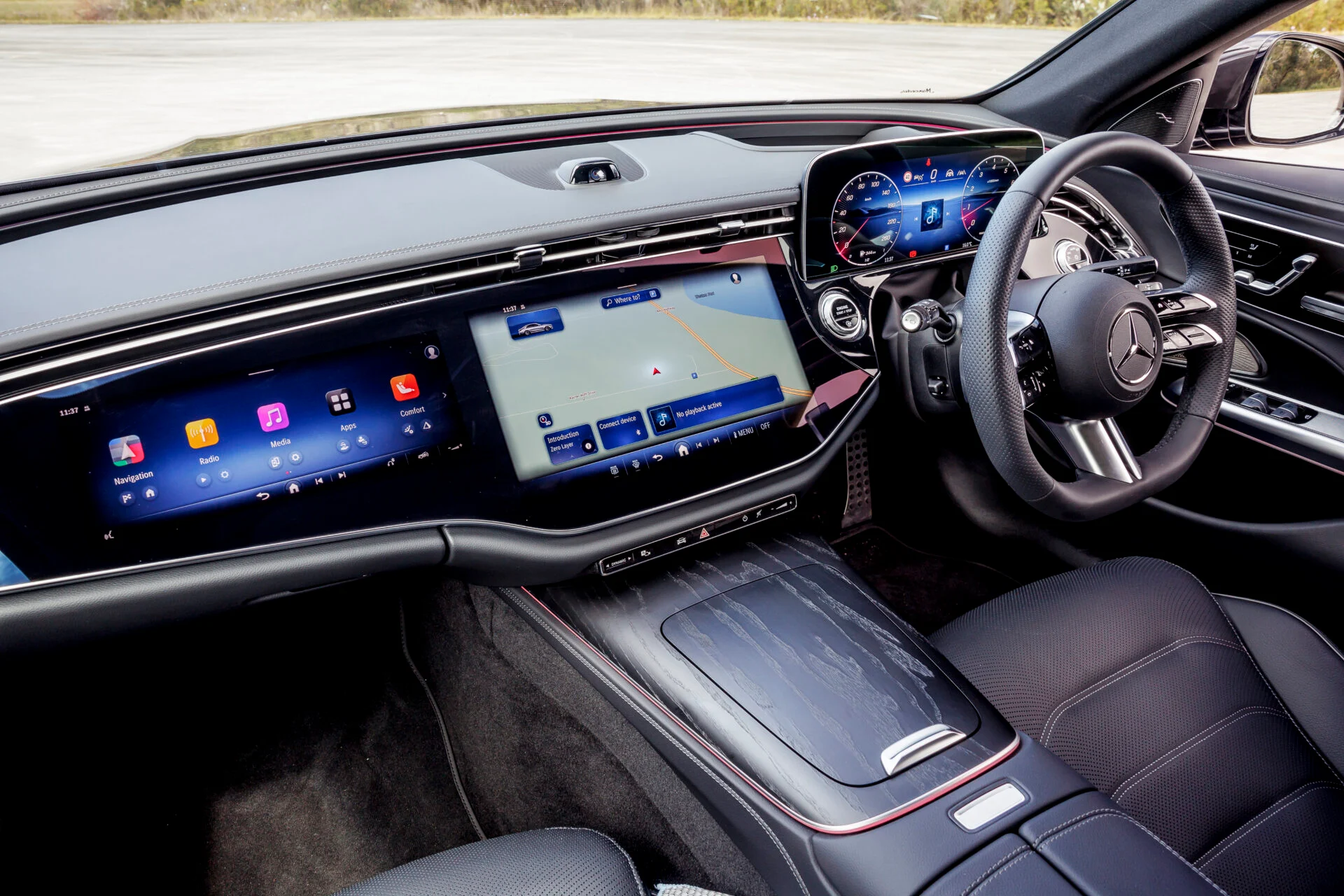
A quiet cabin can turn stressful fast when the screen lags, the map freezes, or the phone refuses to connect before a morning commute. For many American drivers, infotainment features now shape the trip almost as much as steering feel, seat comfort, or fuel economy. A good system keeps your eyes up, your hands calmer, and your route easier to manage when traffic on I-95, the 405, or a packed suburban school route decides to test your patience. It is not about having the biggest screen in the showroom. It is about whether the tech works when you need it, stays out of the way when you do not, and helps you make better choices behind the wheel. For drivers comparing new models, reading owner advice, or browsing practical automotive resources like trusted vehicle technology insights, the smartest move is to judge cabin tech by daily use, not showroom sparkle. The right setup should feel less like a gadget and more like a good co-driver.
Smarter Screens That Reduce Driver Stress
A modern dashboard screen has one job before anything else: lower the mental load on the driver. Too many automakers forget that a car is not a living room, and a touchscreen is not a tablet you can study for ten seconds at a time. The best systems respect motion, glare, speed, and stress.
Why car touchscreen systems must be easy at a glance
Good car touchscreen systems make common actions obvious before the driver starts hunting. Climate controls, maps, audio, phone calls, and camera views need clear placement because hesitation becomes risk on a busy road. A driver in Chicago traffic should not have to dig through three menus to lower the fan or switch from navigation to a call.
The counterintuitive truth is that a smaller screen with better layout often beats a giant display with poor logic. Size looks good in ads, but spacing, contrast, and button placement matter more after sunset, in rain, or while wearing sunglasses. A well-made 10-inch screen can feel safer than a wide dashboard panel that hides simple tasks behind glossy menus.
Physical controls still matter too. A volume knob, a home button, or a dedicated defroster switch can save attention when the screen is busy. Automakers that keep a few real controls are not being old-fashioned. They are admitting that fingers and eyes behave differently when a car is moving.
How layout choices change daily comfort
A smart layout learns the difference between parked use and driving use. When you are stopped in a driveway, deep settings are fine. When you are moving, the system should push the most common tools forward and bury distractions. That one design choice can make the cabin feel calmer.
Take a parent driving through a school pickup line in Texas. The screen may need to show backup camera views, incoming calls, a route change, and audio at the same time. Poor design turns that moment into clutter. Better design gives each feature a clear role and avoids stacking alerts like pop-ups on an old computer.
The best cabins also use visual hierarchy. Big icons for urgent actions. Muted alerts for minor updates. Clear map lines for turns. This sounds simple, yet many cars still treat every notification as equally important. That is how drivers end up annoyed by the very tech they paid extra to get.
Connectivity That Fits Real American Driving
A connected cabin should not feel like a tech demo. It should fit the messy rhythm of American driving, from short grocery runs to long highway stretches between states. When phone pairing, maps, messages, and audio work together, the whole vehicle feels easier to live with.
Why wireless smartphone connection matters
A wireless smartphone connection removes one of the small daily irritations that piles up over time. Drivers do not want to plug in a cable every time they run into a store, pick up coffee, or restart the car after getting gas. Smooth pairing makes short trips feel less clumsy.
Still, wireless systems need discipline. A connection that drops near toll booths, parking garages, or dense city blocks can frustrate drivers more than an old wired setup. The best systems reconnect fast and do not force the driver to restart the car, reopen the app, or fight Bluetooth settings on the roadside.
A good setup also separates drivers cleanly. In a family SUV, the car should know whether the morning driver wants a podcast, the evening driver wants satellite radio, or the teen driver needs limited phone access. Shared vehicles expose weak software fast because every trip starts with a different phone, account, and habit.
How connected car technology supports longer trips
Connected car technology becomes most useful when the road gets unfamiliar. Real-time traffic, route changes, charging station details, parking help, and weather alerts can turn a tiring drive into a manageable one. On a road trip from Atlanta to Orlando, that can mean avoiding a backup before you are trapped in it.
The unexpected insight is that connectivity is not only about convenience. It can protect time, energy, and decision quality. When the system warns you about a closed exit early, you stay calm. When it finds a fuel stop before the tank gets low in rural areas, you avoid poor choices made under pressure.
Some drivers worry that connected systems make cars feel too dependent on software. That concern is fair. A strong vehicle still needs core functions to work without a data signal. Maps should cache routes, radio should still play, and basic controls should never depend on a cloud service behaving perfectly.
Voice, Navigation, and Audio That Keep Attention Forward
Driving rewards simple actions. The less you touch, scroll, and correct, the more attention stays on the road. Voice tools, navigation, and sound systems work best when they reduce effort instead of adding another layer of commands to remember.
When voice control in cars feels natural
Voice control in cars earns its place when it understands normal speech. Drivers should be able to say, “Take me home,” “Call Mom,” or “Find coffee near the next exit” without sounding like they are reading a machine manual. Stiff commands break the illusion and make people give up.
A Florida driver heading through sudden rain should not have to tap through a screen to adjust a route or answer a call. Voice should handle that moment with speed and accuracy. It should also confirm the right action without turning every command into a long conversation.
The hard part is restraint. Voice systems should not talk too much. Drivers need confirmation, not a lecture from the dashboard. A short response keeps trust intact, while a long one creates noise in a space that already has road sound, passengers, and traffic stress.
Why navigation must do more than show maps
Modern navigation is no longer about drawing a blue line from one place to another. Drivers expect lane guidance, speed limit cues, traffic rerouting, arrival estimates, and nearby stop suggestions. Those tools matter most when roads are crowded and exits arrive fast.
A driver crossing Los Angeles during rush hour needs more than a route. The system should explain which lane to hold, when a delay matters, and whether a side street actually saves time. Bad navigation chases tiny gains and sends drivers into stressful cuts through neighborhoods. Good navigation knows when staying put is the smarter move.
Audio deserves the same thought. Clear prompts should lower music at the right moment, not blast over a conversation or disappear under a podcast. A cabin that balances audio well feels polished because it handles details drivers notice only when they go wrong.
Safety, Privacy, and Long-Term Value
Technology inside a car should age well. That means it needs updates, clear settings, privacy controls, and safety logic that does not punish the driver with alerts for every harmless movement. The real test begins after the new-car excitement fades.
How alerts should help instead of annoy
Driver alerts can prevent mistakes, but too many warnings train people to ignore all of them. A lane alert that buzzes on every narrow road or a speed warning that nags during normal flow becomes background noise. That is dangerous because the driver may tune out the one alert that matters.
Better systems sort urgency. A forward-collision warning deserves a stronger signal than a mild lane drift. A blind-spot warning should be clear without feeling dramatic. When alerts match real risk, drivers trust them more.
A common example appears in suburban parking lots. Cross-traffic alerts can help when backing out between two large SUVs, but constant beeping from nearby pedestrians, carts, and curbs can overwhelm the moment. Strong software reads context. Weak software panics.
Why privacy settings belong in the buying decision
Connected cabins collect data through phones, apps, maps, and vehicle systems. Many drivers focus on horsepower, monthly payments, and trim levels, then skip the privacy menu entirely. That is a mistake. The car now knows routes, contacts, locations, and sometimes driving habits.
Privacy does not mean rejecting connected car technology. It means knowing what you have turned on. Drivers should review data-sharing options, app permissions, location history, and profile settings before treating the system as normal. A few minutes in the menu can prevent years of unwanted sharing.
Long-term value also depends on update support. A car with strong hardware but abandoned software can feel old fast. Buyers should ask how updates work, whether maps stay current, and whether key features require subscriptions after a trial period. The monthly cost after year one matters as much as the screen size on delivery day.
Conclusion
The smartest cabin tech is not the loudest, widest, or most expensive package on the window sticker. It is the system that helps you drive with less friction on an ordinary Tuesday, then still earns your trust on a long weekend trip. That is the standard buyers should use before paying for an upgrade.
Infotainment features should make the car feel calmer, not busier. They should connect your phone without drama, guide you without confusion, and protect your attention instead of stealing it. A screen that looks impressive in a showroom but irritates you every day is not premium. It is a bad habit built into the dashboard.
Before choosing your next car, spend time with the system while parked. Pair your phone, test the map, try voice commands, change audio, adjust climate, and check privacy settings. The best test drive is not only on the road; it is also in the menus. Choose the cabin that makes the hard parts of driving feel lighter.
Frequently Asked Questions
What are the most useful car infotainment features for daily driving?
Navigation, phone pairing, voice control, audio management, backup camera views, and clear climate access matter most. Daily driving rewards speed and simplicity. A feature earns its place when it saves attention, reduces taps, or helps you make a safer choice behind the wheel.
Are car touchscreen systems better than physical buttons?
Touchscreens work well for maps, media, and settings, but physical buttons still win for quick actions. Volume, defrost, temperature, and hazard controls should be easy without looking down for long. The best cabins mix screen flexibility with a few dependable hard controls.
Why does wireless smartphone connection keep dropping in some cars?
Dropped connections can come from weak software, phone compatibility issues, Bluetooth conflicts, outdated apps, or signal-heavy areas. Restarting the phone and updating vehicle software may help. A reliable system should reconnect quickly without forcing the driver through repeated pairing steps.
Is voice control in cars safer than using the screen?
Voice control can be safer when it understands commands fast and keeps eyes forward. Poor voice systems can become distracting if they misunderstand, overtalk, or require exact phrasing. Test it with real commands before judging whether it helps your driving style.
Does connected car technology require a monthly subscription?
Some connected services are free for a trial period, then move to paid plans. Navigation traffic, remote start apps, emergency services, Wi-Fi, and advanced map tools may have separate costs. Always check the subscription details before buying a vehicle.
How can I protect privacy in a connected vehicle?
Review the privacy menu, limit location sharing, remove old phone profiles, control app permissions, and read data-sharing options during setup. Before selling or returning a car, reset the infotainment system so your contacts, routes, and saved accounts are removed.
What should I test during a car infotainment demo?
Pair your phone, open maps, make a voice command, change the station, adjust temperature, switch profiles, and check camera views. Use the system like you would on a normal commute. A short hands-on test reveals more than a sales brochure.
Do bigger infotainment screens make driving easier?
Bigger screens help only when the layout is clear and common controls stay easy to reach. A large display with buried menus can create more distraction. Screen quality, response speed, icon placement, and simple navigation matter more than raw size.