

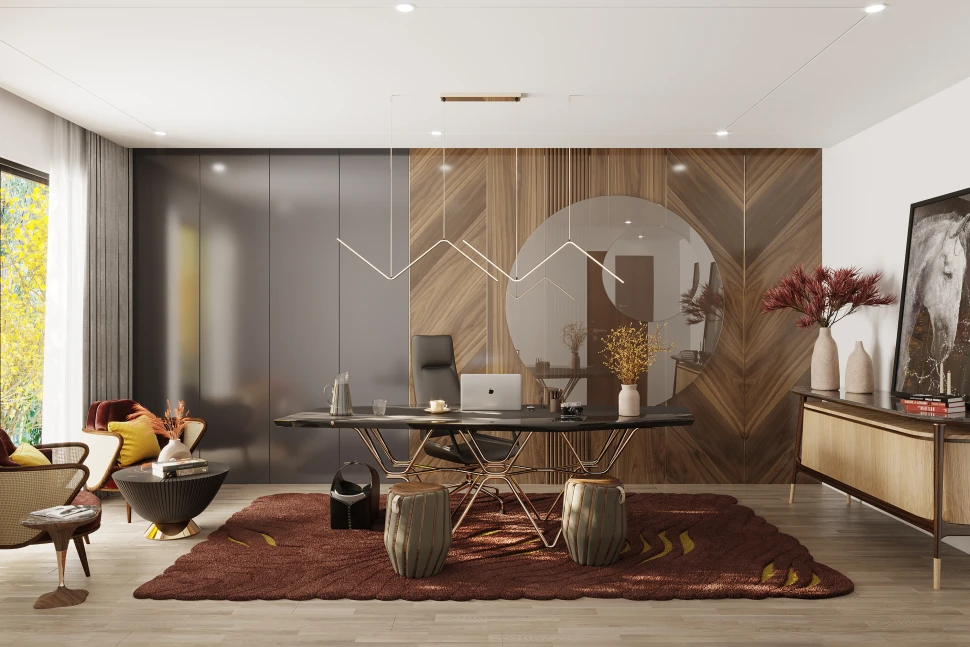
A home office can either protect your attention or quietly drain it before lunch. That sounds dramatic until you sit down at a cluttered desk, face a dim corner, hear the dishwasher running, and wonder why your brain feels tired before the real work begins. The smartest home office ideas are not about copying a showroom. They are about building a space that supports the way you think, move, pause, and recover during an ordinary workday.
For many Americans, work no longer happens in one fixed place. A laptop might sit in a spare bedroom in Dallas, a kitchen nook in Chicago, a basement in Ohio, or a small apartment corner in Brooklyn. That makes design more personal than it used to be. A good setup has to handle video calls, deep work, paperwork, storage, lighting, and the messy rhythm of home life. Helpful resources from a trusted digital publishing network can point readers toward better design choices, but the real test is simpler: does your office help you start faster, stay calmer, and finish the day with something left in the tank?
Design the Room Around Attention, Not Decoration
Pretty rooms get attention online, but useful rooms earn trust over time. A home office should first answer one question: what helps you think clearly for longer stretches? Once that answer is honest, the room starts making sense. The chair, desk, lighting, storage, and background all serve the work instead of competing with it.
Start With the Work You Actually Do
A person who spends six hours on Zoom needs a different setup than someone who writes reports, manages invoices, edits photos, or runs a small online shop. A remote project manager in Atlanta may need a clean video background, a second monitor, and a whiteboard within reach. A freelance designer in Portland may care more about a wide desk, color accuracy, and space for samples.
The mistake is designing for the fantasy version of work. Many people buy a tiny writing desk because it looks neat, then realize they need room for a laptop, notebook, coffee, phone stand, and printed documents. The better move is to map your daily tools first. Put the things you touch most often closest to your body. Put the rest away.
A strong office is honest about friction. If you constantly stand up to grab a charger, your setup is wasting energy. If your printer sits across the house, paperwork becomes a small interruption with a long tail. Those tiny breaks matter because attention does not always return cleanly.
Use Visual Boundaries to Train Your Brain
Your brain reads space faster than you think. When a work area blends into laundry, toys, dishes, or bedroom clutter, your attention keeps picking up signals that have nothing to do with work. Visual boundaries help your mind understand when it is time to focus and when it is time to stop.
A boundary does not require a separate room. A rug under the desk, a bookcase behind the chair, a folding screen, or a painted wall section can tell the brain, “This is the work zone.” In a small Phoenix apartment, even a desk facing one calm wall can outperform a bigger setup facing the entire living room.
The counterintuitive part is that less space can sometimes create better focus. A compact office corner with clear edges often works better than a large spare room that collects boxes, gym gear, and old furniture. Space is not the prize. Control is.
Home Office Ideas That Improve Comfort Without Making You Lazy
Comfort has a strange reputation in work spaces. Some people think a comfortable office makes them soft. That is wrong. The right comfort keeps the body from becoming the loudest problem in the room. When your neck, eyes, back, or wrists start complaining, your mind has to split its attention. Focus leaks out through the body first.
Choose a Chair and Desk Height That Reduce Strain
A good chair does not need to look expensive. It needs to support your lower back, let your feet rest flat, and keep your shoulders from creeping toward your ears. Many Americans working from home still use dining chairs for eight-hour days, then wonder why they feel worn out by midafternoon. Dining chairs were built for dinner, not spreadsheets.
Desk height matters just as much. Your elbows should sit near a relaxed angle when typing, and your screen should land close to eye level. A laptop on a flat desk usually fails that test. A simple laptop stand with a separate keyboard can change the entire feel of the day. It is not glamorous. It works.
The unexpected truth is that the most comfortable setup is not always the softest one. A plush chair that encourages slouching can cause more fatigue than a firmer chair with better support. Comfort should keep you alert, not turn your office into a nap trap.
Build Movement Into the Setup
Stillness is one of the hidden problems of home work. In an office building, people walk to conference rooms, parking lots, elevators, break rooms, and coworkers’ desks. At home, the commute may be twelve steps. That sounds convenient until your body starts acting like it has been parked all day.
A standing desk can help, but it is not the only answer. A small walking pad, a timer for stretch breaks, a printer placed a few steps away, or a standing call routine can build motion into the day. A marketing consultant in Denver might take client calls while standing near a window, then sit for focused writing blocks. That rhythm keeps energy from going flat.
Movement also protects the line between work and home. When you physically reset between tasks, your mind gets a cue that one mode has ended and another has begun. That cue matters more than most people admit. Without it, the day turns into one long blur.
Control Light, Sound, and Background Before Buying More Decor
Many home offices fail because people decorate before they solve the sensory problems. A nice print on the wall cannot fix glare. A stylish shelf cannot cancel street noise. A beautiful desk lamp cannot help if the room’s main light throws shadows across your screen. Sensory comfort is not extra. It is the foundation.
Use Natural Light Without Letting It Take Over
Natural light can lift mood, sharpen alertness, and make a workday feel less boxed in. Still, light has to be managed. A desk facing a bright window can create glare. A desk with a window behind it can make video calls look washed out. The best position often places the window to the side, where daylight supports the room without attacking the screen.
Homes across the U.S. deal with different light problems. A south-facing room in Arizona may need filtered shades by noon. A cloudy Seattle office may need layered lighting even during the day. A basement workspace in Michigan may need warmer lamps to avoid that cold, underground feeling that slowly lowers energy.
The surprise is that perfect brightness is not the goal. Adjustable light is better. A room that can shift from bright task work to softer planning mode gives the brain variety. That variety helps the day feel less mechanical.
Reduce Noise Without Making the Room Feel Dead
Noise control starts with knowing which sounds bother you. Some people can ignore traffic but lose focus when a dog barks. Others can handle household noise but struggle with echo during calls. The solution depends on the sound, not on a generic idea of silence.
Rugs, curtains, fabric panels, bookshelves, and upholstered chairs can soften echo. A white noise machine or fan can cover unpredictable sounds. Noise-canceling headphones help when the house is active. In a busy family home in New Jersey, a parent may not be able to remove noise, but they can reduce the sharp edges of it.
A completely silent room can feel tense. That is the counterintuitive part. Many people focus better with a low, steady sound than with total quiet. The goal is not silence. The goal is fewer interruptions that pull your mind out of the task.
Make Storage Serve Decisions, Not Clutter
Storage is often treated like a place to hide mess. That thinking creates packed drawers, mystery bins, and shelves full of things nobody wants to sort. Good storage does something better. It removes small decisions from the workday so your mind stays available for harder problems.
Keep Daily Tools Visible and Occasional Tools Hidden
A useful desk does not need to be empty. It needs to be intentional. Your keyboard, notebook, pen, water, task light, and current project can stay visible. Old mail, random cords, receipts, packaging, and half-finished personal errands need another home. The desk should not become a public square for every loose object in the house.
Occasional tools should live close but not on the surface. Use a drawer tray for chargers, stamps, sticky notes, and cables. Use a labeled file box for tax papers, school forms, client documents, or home records. A small business owner in Tampa might keep shipping labels and receipts in one pull-out bin instead of letting them spread across the office.
The deeper point is that clutter is often delayed decision-making. Every unsorted item asks a quiet question. Do I need this? Where does it go? Should I handle it now? A better storage system answers those questions before they multiply.
Create an End-of-Day Reset That Takes Five Minutes
A home office needs a shutdown ritual. Without one, work residue stays in the room and in your head. Five minutes is enough if the system is simple: clear the desk surface, plug in devices, place tomorrow’s first task in view, empty the coffee cup, and close anything that belongs to the day behind you.
This habit matters more in homes where the office shares space with life. A desk in a bedroom should not stare at you like unfinished business at 10 p.m. A nook near the kitchen should not carry the stress of Monday into Saturday breakfast. Resetting the space gives your mind permission to leave.
The unexpected benefit is morning speed. When you sit down to a ready desk, you avoid the small negotiation that usually starts the day. No searching. No clearing. No deciding where to begin. The room hands you the first move.
Frequently Asked Questions
What are the best small home office ideas for apartments?
Use vertical storage, a narrow desk, wall-mounted shelves, and a clear visual boundary like a rug or painted wall section. Keep only daily tools on the surface. A compact office works best when every item has a reason to be there.
How can I make my home office more comfortable for long workdays?
Start with chair support, desk height, screen position, and lighting. Add movement breaks before buying extra decor. Comfort should reduce strain while keeping you alert, so avoid setups that encourage slouching or make the room feel sleepy.
What is the best place to put a desk in a home office?
Place the desk where glare, noise, and distractions are easiest to control. A side-facing window often works well because it gives daylight without shining into your eyes or behind you during video calls.
How do I create a home office in a bedroom?
Use a clear boundary between sleep and work. A folding screen, compact desk, closed storage, or end-of-day reset can help. Keep work items out of sight after hours so the bedroom still feels restful.
What colors are best for a focused home office?
Soft neutrals, muted greens, warm whites, and calm blues often support concentration. The best color depends on light and mood. Avoid colors that feel harsh in your room during the hours you work most.
How can I reduce distractions while working from home?
Control what you see, hear, and reach for. Face a calmer wall, soften noise with rugs or curtains, keep your phone away from the desk, and set up your first task before the day begins.
What should every home office include?
A supportive chair, stable desk, proper lighting, reliable internet, easy charging, basic storage, and a clean video-call background cover most needs. Add specialized tools only after you understand your daily work habits.
How do I keep my home office organized every day?
Use a five-minute shutdown routine. Clear the desk, file loose papers, return tools to their spots, plug in devices, and prepare tomorrow’s first task. Small daily resets prevent clutter from becoming a weekend project.